How to mark a deposit as paid in house
Here is a guide on how to mark a deposit on a booking as paid ‘in house’
- Find the booking within the LIVE CONSOLE
- Click VIEW
- Click BOOKING PRE-PAY
- Change the payment status to PAID
- Enter the payment description – eg A deposit of £5 per person is required to secure this booking
- Ignore the cut off date and cut off time
- Enter the amount they have paid
- Select the payment type as TAKE PAYMENT
- Ignore the Transaction ID box
- Click SAVE CHANGES
You should then see on the left hand side the total paid and underneath the time and date paid and the processor will be listed as VENUE
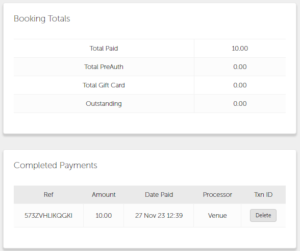
Once you have generated this, a little green £ sign, will appear next to the customers name in the live console.