Close off a times on specific days (ADHOC)
Need to close off a specific time on a random day?
You may need to stop bookings for a small time frame on a random Tuesday when you maybe short staffed in the kitchen, or you have a large party coming in and you don’t want to take any bookings for a short period of time before and after they arrive – not to worry, here we will show you how to add this quickly and easily.
- Click the LIVE CONSOLE
- Go to the date you need to block off
- Click the COG
- Scroll down to the FULL FROM / FULL TO
- Select the times you need to block off and click ADD
- You will see the times you have just added below
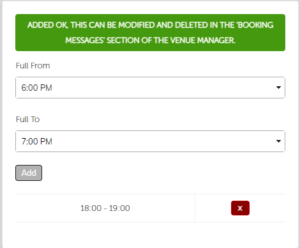
- The message will default to ‘Sorry we are fully booked between 6:00 PM and 7:00 PM.’
- If you want to change the wording of the message, you can do this by clicking the Togo logo in the top left of the screen
- Click MANAGE VENUE
- Click BOOKING MESSAGES
- Scroll to the bottom of the page where you will see your booking messages listed
- Click EDIT next to the booking message
- Amend the message in the message box and once done click SAVE CHANGES
On this screen you can also select whether this effects your bookings in house. If you still want to enable staff to take bookings during this time but just block customers from booking, tick NOT VENUE.